
Monday, April 23, 2012

Tuesday, February 14, 2012
Crab's Journey.
This video is a great example of character design with regard to environment shaping anatomy.
There are several things about this video that struck me as inspirational, animation wise. The opening shot, in which the crabs are sort of being tossed around in unison by the current, and stabilizing themselves with their legs was somewhat eye opening. The legs aren't the only driving force behind the locomotion, and act as balance mechanisms. A very interesting counter to this video is another where a crab uses similar legs to walk on land, without current, and without an active outside force.
Notice how stable that body is without the ocean's current shifting it around. It's interesting to see an adaptation to environmental differences so profoundly expressed via changes in movement.
And finally, check out this guy:
Holy shit that walk cycle is neat.
(Also of note: the ray eating in the first video is terrifying, but I do appreciate the, "Fuck y'all I'm out" exit.)
There are several things about this video that struck me as inspirational, animation wise. The opening shot, in which the crabs are sort of being tossed around in unison by the current, and stabilizing themselves with their legs was somewhat eye opening. The legs aren't the only driving force behind the locomotion, and act as balance mechanisms. A very interesting counter to this video is another where a crab uses similar legs to walk on land, without current, and without an active outside force.
Notice how stable that body is without the ocean's current shifting it around. It's interesting to see an adaptation to environmental differences so profoundly expressed via changes in movement.
And finally, check out this guy:
Holy shit that walk cycle is neat.
(Also of note: the ray eating in the first video is terrifying, but I do appreciate the, "Fuck y'all I'm out" exit.)
Thursday, January 5, 2012
Earthflight.
I caught the first episode of this series yesterday but it's since been removed. Amazing, amazing footage. The trailer doesn't even do it justice.
If you have any interest in animation, birds(I am horribly fascinated by their behavior), or just nature in general, I highly recommend paying attention for a pending U.S. release date.
If you have any interest in animation, birds(I am horribly fascinated by their behavior), or just nature in general, I highly recommend paying attention for a pending U.S. release date.
Monday, November 14, 2011
Workflow.
I recently updated my workflow a bit and tonight I asked some other animators how they do a few basic things within Maya. What I learned was shocking. It seems that nearly all of them use Maya's default hotkey settings and, in some cases, didn't even use those when available. With 3d software packages there is typically a default setting to accommodate many different disciplines that don't necessarily make sense for just one in particular, such as modeling, animation, or rigging. The programs usually try to hit the lowest common denominator across disciplines instead, often leaving each specialty somewhat wanting for a better workflow.
 This might not sound like a big deal but over time every second you lose by not having a workflow that aids your speed or particular interest at the moment (or just using defaults in general) adds up. I'm sure I touch on the subject of key layout too much but it's something I really believe can help any animator.
The main thing I noticed among other animators was that when I asked them to show me how they start and stop their animation playback they all moved their mouse to the lower right corner of the screen and hit the play button. I was baffled. This is the slowest way to perform that action and a major productivity killer. Not only do they have to remove their mouse from the viewport, they also have to take their eyes off of their animation, carefully move the mouse to the corner of the screen, and focus on something other than their work (Note that Maya does have a hotkey for a playback toggle, Alt+v, but even using two buttons seems tedious to me).
 When I asked about scrubbing, the same thing occurred. They moved their mouse down, away from their scene, onto the timeline and left-click-dragged. Again, this causes you to remove the mouse and the eyes from the scene. What this way of working essentially does is remove your focus from your work and slows down anything else you might want to accomplish.
For the few folks that said there wasn't a difference between pushing a play button and having a hotkey I made a point to show them that when you have keys to use both the playback toggle and the scrub tool (timedraggertoolactivate) you can also quickly do those other things with your mouse still in the viewport, such as stopping playback, rotating the view, adjusting animation, and then playing the animation again.
Maya has a lot of default key settings I've removed or abandoned but the biggest improvement I think I've discovered (for animation) is that you don't have to hold down any key to perform an action. For example, holding Alt and using mouse buttons is the prime way to navigate the viewport. Instead, assigning the individual tools, tumble and track, to a key allows me to simply click a button and have the tool active. I don't ever have to hold down a button at any time(yes, I never hold Alt in Maya).
The same idea applies to the time drag tool(k), which I simply turn on and leave on because I've removed the "off" function. There is no holding down a button while I left click and drag. When I no longer need to scrub I switch to another tool, such as move, rotate, or even use my playback options, which is what an animator will typically do anyhow. The real benefit of all of these options is that my mouse, and specifically my eyes, never leave the scene. I am always looking directly at the animation and not trying to locate some other button elsewhere in the UI, and because of the flexibility I'm also able to switch to any other tool I might need to on the fly, stopping and starting my playback at will.
Upon suggesting this type of custom layout I was confronted with the idea that sometimes you will have to work on another person's computer, using default settings, so that's what you should use. Sure, that happens, but I'd argue that in order to get to the point of creating a custom setting it's pretty apparent you need to know the basics anyhow and you definitely should(You have to know the rules before you can break them). In a network setting it's also very easy to save and load your personal preferences very easily. I also understand that in a teaching scenario you might want to use the basics so everyone is on the same page. Again, that's fine, but one of the best lessons I ever got from a mentor was to make the program work for me.
 One last thing I've learned about animating in 3d is that real estate is important. The amount of space you have on screen to view your animation is a huge deal. Maya 2012's new UI allows the removal of several key elements that I've now put on a second monitor. This includes the channel box and several other tear away menus. The result (pic soon) is a very basic, simple, and clean viewport that leaves the maximum amount of room to see my animation in the greatest amount of space.
I guess I'm kind of taking back what I've said about there being no "Wrong Way" to animate because working smarter is indeed better. It won't help your curves but it will make you a hell of a lot faster.
 This might not sound like a big deal but over time every second you lose by not having a workflow that aids your speed or particular interest at the moment (or just using defaults in general) adds up. I'm sure I touch on the subject of key layout too much but it's something I really believe can help any animator.
 The main thing I noticed among other animators was that when I asked them to show me how they start and stop their animation playback they all moved their mouse to the lower right corner of the screen and hit the play button. I was baffled. This is the slowest way to perform that action and a major productivity killer. Not only do they have to remove their mouse from the viewport, they also have to take their eyes off of their animation, carefully move the mouse to the corner of the screen, and focus on something other than their work (Note that Maya does have a hotkey for a playback toggle, Alt+v, but even using two buttons seems tedious to me).
 When I asked about scrubbing, the same thing occurred. They moved their mouse down, away from their scene, onto the timeline and left-click-dragged. Again, this causes you to remove the mouse and the eyes from the scene. What this way of working essentially does is remove your focus from your work and slows down anything else you might want to accomplish.
For the few folks that said there wasn't a difference between pushing a play button and having a hotkey I made a point to show them that when you have keys to use both the playback toggle and the scrub tool (timedraggertoolactivate) you can also quickly do those other things with your mouse still in the viewport, such as stopping playback, rotating the view, adjusting animation, and then playing the animation again.
Maya has a lot of default key settings I've removed or abandoned but the biggest improvement I think I've discovered (for animation) is that you don't have to hold down any key to perform an action. For example, holding Alt and using mouse buttons is the prime way to navigate the viewport. Instead, assigning the individual tools, tumble and track, to a key allows me to simply click a button and have the tool active. I don't ever have to hold down a button at any time(yes, I never hold Alt in Maya).
The same idea applies to the time drag tool(k), which I simply turn on and leave on because I've removed the "off" function. There is no holding down a button while I left click and drag. When I no longer need to scrub I switch to another tool, such as move, rotate, or even use my playback options, which is what an animator will typically do anyhow. The real benefit of all of these options is that my mouse, and specifically my eyes, never leave the scene. I am always looking directly at the animation and not trying to locate some other button elsewhere in the UI, and because of the flexibility I'm also able to switch to any other tool I might need to on the fly, stopping and starting my playback at will.
Upon suggesting this type of custom layout I was confronted with the idea that sometimes you will have to work on another person's computer, using default settings, so that's what you should use. Sure, that happens, but I'd argue that in order to get to the point of creating a custom setting it's pretty apparent you need to know the basics anyhow and you definitely should(You have to know the rules before you can break them). In a network setting it's also very easy to save and load your personal preferences very easily. I also understand that in a teaching scenario you might want to use the basics so everyone is on the same page. Again, that's fine, but one of the best lessons I ever got from a mentor was to make the program work for me.
 One last thing I've learned about animating in 3d is that real estate is important. The amount of space you have on screen to view your animation is a huge deal. Maya 2012's new UI allows the removal of several key elements that I've now put on a second monitor. This includes the channel box and several other tear away menus. The result (pic soon) is a very basic, simple, and clean viewport that leaves the maximum amount of room to see my animation in the greatest amount of space.
 I guess I'm kind of taking back what I've said about there being no "Wrong Way" to animate because working smarter is indeed better. It won't help your curves but it will make you a hell of a lot faster.
Saturday, October 22, 2011
Monday, October 10, 2011
Animating The Wrong Way.
It probably seems that I have a very rigid disposition when it comes to exactly how someone should animate. It might sound as if I think the way I animate is the way everyone should work or that it is the Right way to work. In actuality there is only one Wrong way to animate. There are so many different types of motion a game animator has to deal with that one workflow can't handle every situation. A good animator is adaptable, malleable and creates movement in smart ways. Smart work is what I will forever push for, sometimes at the cost of quality. In many ways game animators have to forget that they are making single, unique, special animations for themselves and are instead making a product for someone else. They're shaping an experience.
I started this blog mainly to document the way I put keys down and why, maybe just to remind myself how I should work, to keep from getting lazy, but also perhaps because I have been seeing so many demos that, quite frankly, do not cut it. Reels with too much overlap, excessive squash and stretch, unrealistic motion, stiff movement, poor action, soft hits, and bland expression are fairly commonplace among new animators. It occurred to me that a lot of folks are being taught poor habits, poor techniques, and even worse, poor direction. Upon writing all of this it also struck me that I don't actually have a demo reel. I have never had a demo reel. Hell, I don't even have 3d software at home.
I don't remember exactly who it was (probably this guy) that told me as an animator my job was "sculpting time" but initially I took that very literally. It meant I was moving characters around in a 3d program, creating motion within a framework, applying that motion to a certain amount of time, and making shit move. I think that same phrase still applies to how I go about the job now, but not necessarily in the same sense. Instead it means that the viewer, the player, is getting an experience I am helping create. Up against Milt Kahl talking about, "Where you were, where you are, and where you are going," the idea of Sculpting Time might be the second best thing I ever learned on this job.
In the past ten years I have recognized moments where I've gotten a little lazy. I want to work on big, fantastic, player driven experiences so much that sometimes the small stuff that needs to be done feels like a bore. Some tasks are so tedious that I simply do not want to throw any love their way. This could be anything from a blend set to a walk cycle but the majority of the time that I do my worst work is when I disagree with design. It's frustrating because I am the one who has to make an idea I don't like move but I also recognize that that is what comes with the job. Sometimes I'm wrong and sometimes I am proven right. It works both ways. Often the best solutions come from collaboration. In any case, everything the player experiences is actually important.
I have often dreaded the impending demise of the sense of adventure I felt as a kid playing games. I always felt an affinity towards the avatars in games as something of an escape but also as an experience. I got to Be someone else. I got to do things I couldn't do; Incredible, unbelievable things. The trepidation I have towards playing games these days has a lot to do with the rise of First Person games but also with the lack of appealing stories and characters, and subsequently, personalities. This might be due to the amount of pseudo "realism" injected into 3d games and the fact that I can no longer take away my own interpretation of their characters. Maybe they're just not good characters to begin with. Maybe I'm just a dinosaur who doesn't understand the market.
All I have ever wanted to make in this business is a recreation of the sense of adventure I got as a kid, whether watching The Goonies or playing The Legend of Zelda. As an animator the best I can do to achieve that goal is to give the viewer, the player, an experience.
Getting back to the Right and Wrong way to animate I see that not liking the idea you are working on should not be a deterrent to creating quality animation. Not giving enough care to what you are making is, in fact, the only Wrong way to animate.
I started this blog mainly to document the way I put keys down and why, maybe just to remind myself how I should work, to keep from getting lazy, but also perhaps because I have been seeing so many demos that, quite frankly, do not cut it. Reels with too much overlap, excessive squash and stretch, unrealistic motion, stiff movement, poor action, soft hits, and bland expression are fairly commonplace among new animators. It occurred to me that a lot of folks are being taught poor habits, poor techniques, and even worse, poor direction. Upon writing all of this it also struck me that I don't actually have a demo reel. I have never had a demo reel. Hell, I don't even have 3d software at home.
I don't remember exactly who it was (probably this guy) that told me as an animator my job was "sculpting time" but initially I took that very literally. It meant I was moving characters around in a 3d program, creating motion within a framework, applying that motion to a certain amount of time, and making shit move. I think that same phrase still applies to how I go about the job now, but not necessarily in the same sense. Instead it means that the viewer, the player, is getting an experience I am helping create. Up against Milt Kahl talking about, "Where you were, where you are, and where you are going," the idea of Sculpting Time might be the second best thing I ever learned on this job.
In the past ten years I have recognized moments where I've gotten a little lazy. I want to work on big, fantastic, player driven experiences so much that sometimes the small stuff that needs to be done feels like a bore. Some tasks are so tedious that I simply do not want to throw any love their way. This could be anything from a blend set to a walk cycle but the majority of the time that I do my worst work is when I disagree with design. It's frustrating because I am the one who has to make an idea I don't like move but I also recognize that that is what comes with the job. Sometimes I'm wrong and sometimes I am proven right. It works both ways. Often the best solutions come from collaboration. In any case, everything the player experiences is actually important.
I have often dreaded the impending demise of the sense of adventure I felt as a kid playing games. I always felt an affinity towards the avatars in games as something of an escape but also as an experience. I got to Be someone else. I got to do things I couldn't do; Incredible, unbelievable things. The trepidation I have towards playing games these days has a lot to do with the rise of First Person games but also with the lack of appealing stories and characters, and subsequently, personalities. This might be due to the amount of pseudo "realism" injected into 3d games and the fact that I can no longer take away my own interpretation of their characters. Maybe they're just not good characters to begin with. Maybe I'm just a dinosaur who doesn't understand the market.
All I have ever wanted to make in this business is a recreation of the sense of adventure I got as a kid, whether watching The Goonies or playing The Legend of Zelda. As an animator the best I can do to achieve that goal is to give the viewer, the player, an experience.
Getting back to the Right and Wrong way to animate I see that not liking the idea you are working on should not be a deterrent to creating quality animation. Not giving enough care to what you are making is, in fact, the only Wrong way to animate.
Tuesday, August 9, 2011
Speed.
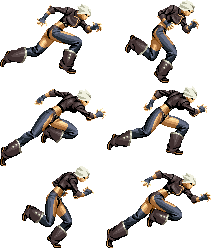 According to myself and a few designers I have worked with I am a fast animator. I'm fast as all hell when it comes to making 3D animation and that doesn't mean I'm the best. It just means I'm fast. I can quickly make an animation that suits design purposes and maybe even animation purposes, but really, I'm just fast. It doesn't mean my animation is superior with regards to motion, or performance, or even action. All it means is that I can make animations very rapidly with regard to turnaround time. What takes some animators days takes me hours or perhaps minutes.
There has been a saying or a joke or what have you throughout my entire career that if a designer needs something done in a short amount of time they ask for a, "Mike Carr Special." That means I make a short animation in about ten to twenty minutes. Something simple, but also, something shippable. This happens a lot. First pass/final pass has always pervaded my workflow but speed is equally essential. Because I work in games and not film there is very little finessing that occurs and, to be fair, it probably shows.
Most of the time what I create has to do with an understanding of a designer's needs but while I work I am also considering the end of the day, the end of the project, and what I am putting my name on. I want it to look good, like most animators do, but a necessity for being fast can crush that idea.
This has a lot to do with how I've made a workflow that is superior for me and specifically, one that organizes most of the options popular software packages out there allow animators. My work setup is alien to others because I am left handed(and most people are not) and because I don't use a majority of the tools that 3D software packages offer. Still, the tools I do use are basically what anyone wanting to execute 3D animation also needs to use, all there on a little number pad with no need for complex inputs(I don't even use ctrl+z for undo anymore). What this really has to do with, however, is that I only work in key poses.
I've heard other animators say that if it looks right it is right, no matter the work flow, whether IK or FK, whether with scattered keys or organized, but that isn't the case. 3D animation is a simplification of animation principles. Key poses and automated interpolation are, at the core, why 3D is immediate. It's why 3D is so much faster and, in my opinion, generally cheaper.
Occasionally I am forced to work on another animator's file. You will never see me more upset or confused when this takes place. From what I understand, in the 2D world this rarely happens. Those scenes or shots are an animator's babies. They are nuzzled and muscled and sculpted into that singular animator's vision of what the director wants. Because it's very rare to find two animators who think exactly alike, when you have to work on another person's files there is always a period of time where you will have to reverse engineer their thinking. That little chunk of time to consider the other animator's work and thought process can sometimes eat up a lot of work hours, and can also lead to a lot of reworking animation.
Perhaps my brain is slightly more middle of the road than other artists with respect to left/right hemisphere dominance (although I doubt it) or maybe I am just a little OCD when it comes to being organized in my files. Perhaps other animators see the act of sliding keys around as part of the animation process. I can assure you, it is entirely unnecessary and contradictory to the very nature of 3D animating; It's contradictory to the nature of animation in general, to be more specific.
The idea of Persistence of Vision gave rise to more scientifically accurate theories, Phi Phenomenon and Beta Movement, both of which examine how the eye perceives a sequence of images with slight changes. These ideas are essentially the basis for why animation works. Your eyes sense change and can therefore make links between individual images to see them as moving pictures/images. If those moving images convey what is necessary to describe a movement, the movement will look correct. 3D interpolation is what this is all about. You don't have to make all those frames, you just have to push the pieces through the right poses at the right time.
I've stressed before how important keeping clean files is but I think I should repeat that sentiment. The bottom line is that 3D animation is not about shifting pieces of a character around to create motion. It's simply about key poses and letting the program do the in between work for you.
A lot of animators(I'm lookin at you, Mentor students) take the idea of squash and stretch to extremes these days, which is unfortunate. The emphasis on creating all of that overlapping, unrealistic motion will often create sloppy, disorganized keys and can, ultimately, slow a project down. Perhaps it's that the dope sheet is a much quicker way to make adjustments than the graph editor but the latter is really where adjustments to timing should be made. The in and out of a trajectory is what animators should be changing, and not the keys.
I will forever praise Valve for the sheer joy that I feel when playing Team Fortress 2(more later on that gem of a game), but the true victory of theirs lies in the character introduction pieces. Of all the, "Meet the," shorts my favorite is the Engineer's. Everything in the clip is just perfection: The offset timing of the kill counter's rotating numbers, the subtle grin he gives as the turret hits its' target, the little shift of weight when preparing to kick the dismembered arm, the left/right sway of the jaw, the voice work, the guitar playing, the fact the song is Jeff Tweedy's, "Someone Else's Song." I could go on for a while.
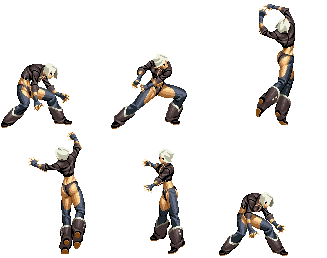
Although I can see very clearly how I would break up this animation into the parts that move at similar pacing, this scene would destroy my workflow. It is so complex and nuanced there is no way to make a file like this in clean columns, with organized spacing, and straight key posing. The left hand alone would be a sea of keys with their own unique timing. In short, when a scene calls for it, be prepared to get messy. It's hard to convey when that is called for and when it is not without a counter example, so consider this page of animations: Vanessa
 Every single one these animations could be done quickly in 3D using only key poses. They are fighting game animations, after all, which are the easiest actions to do with major poses, but even most of the in between frames would be taken care of by automated interpolation. Knowing when you need to get messy and when you need to stay organized are two huge factors in becoming a faster, cleaner, and better animator. I hope the idea catches on, because I'm kind of tired of batting cleanup.
Subscribe to:
Posts (Atom)